Every day, thousands of tender notices are published by central government departments, state government agencies, public sector undertakings (PSUs), railways, defence organizations, municipal corporations, and various other government bodies. The problem is that these opportunities are spread across multiple portals, making it difficult for businesses to track them efficiently.
Many contractors, suppliers, manufacturers, service providers, and MSMEs spend hours searching different websites only to discover that they have missed an important opportunity or found a tender after the submission deadline.
This is where Tender18 helps.
Instead of visiting multiple websites every day, businesses can use Tender18 as a centralized Tender Information Service to search, track, and access relevant tender opportunities quickly and efficiently.
In this guide, we'll show you how to find Government Tenders faster using Tender18 on both desktop and mobile devices.
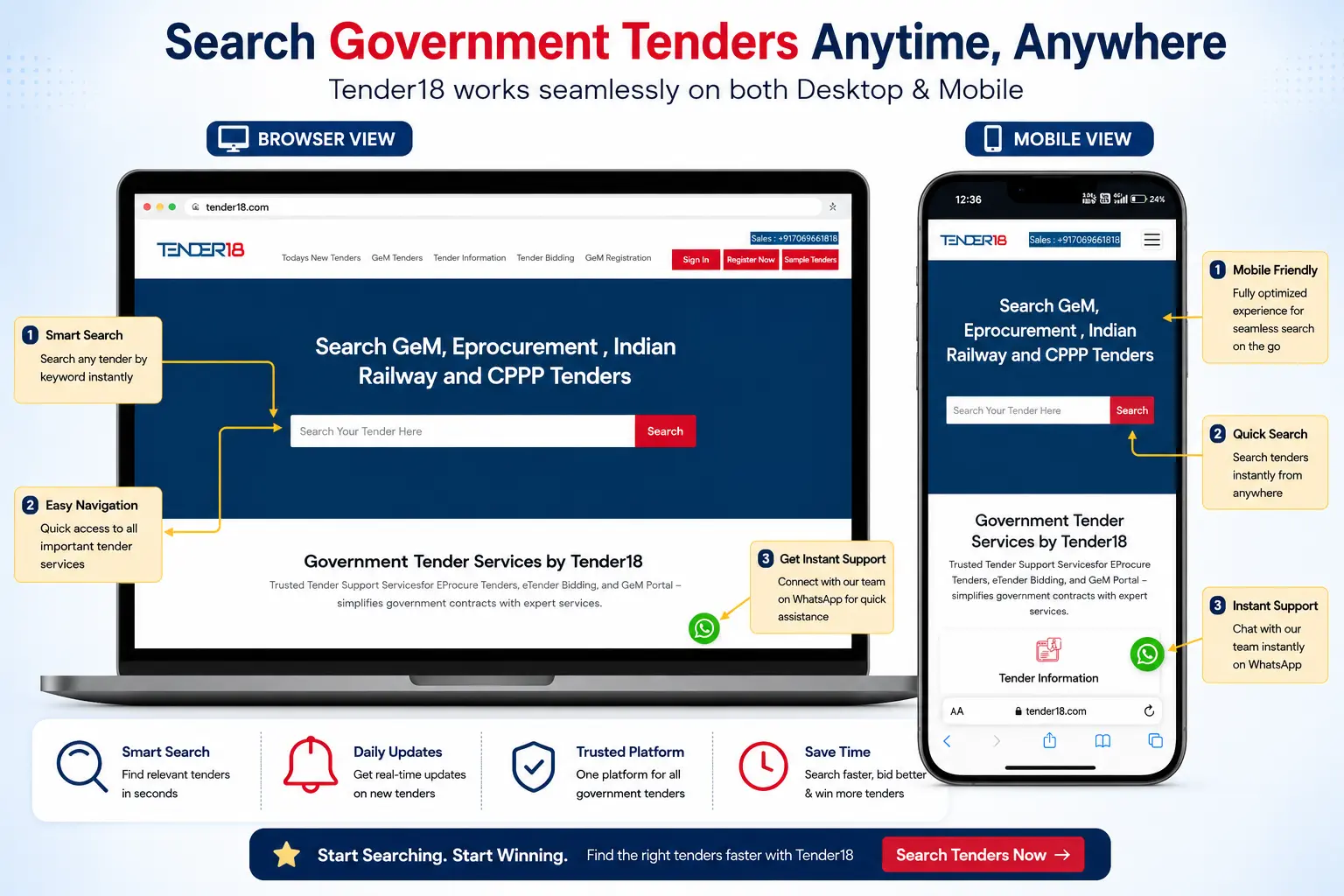
Modern businesses need quick access to tender information whether they are in the office, at a project site, or travelling.
With Tender18, users can access tender opportunities through:
Search and analyze tenders from your computer with complete visibility of tender details, filters, and documents.
Track tenders directly from your smartphone and stay updated while on the move.
Find relevant tenders using simple keywords related to your business.
Quickly browse categories, departments, and locations without unnecessary complexity.
Get assistance whenever you need help understanding or participating in a tender.
Instead of checking multiple procurement portals, businesses can access opportunities from one platform.
The easiest way to find relevant tenders is by using the search feature.
Simply enter a keyword related to your business or service.
Examples include:
Within seconds, Tender18 displays matching tender opportunities related to your search term.
This helps businesses focus only on opportunities that match their products, services, and expertise.
Searching is only the beginning.
To narrow down results further, Tender18 allows users to apply filters that help identify the most relevant opportunities.
You can filter tenders by:
Find opportunities from specific states such as Gujarat, Maharashtra, Telangana, Karnataka, Tamil Nadu, Rajasthan, and many others.
Search tenders from specific government departments and organizations.
View tenders related to construction, supply, IT services, electrical works, healthcare, security services, and more.
Focus on opportunities that match your business capacity and project size.
By using filters effectively, businesses can save time and avoid reviewing irrelevant tender notices.
Once you find a suitable tender, the next step is to review its details carefully.
Tender18 provides access to important information such as:
Reviewing these details helps businesses determine whether the opportunity is worth pursuing before investing time in bid preparation.
Finding a tender is only one part of the process.
Many businesses need assistance with documentation, compliance requirements, eligibility verification, and bid preparation.
Tender18 supports businesses through:
Helping users identify relevant opportunities based on their industry and expertise.
Reviewing tender requirements before participation.
Assistance with preparing and organizing required documents.
Guidance related to Digital Signature Certificates for online tender participation.
Helping businesses understand and navigate the bidding process more effectively.
This additional support helps reduce errors and improve participation confidence.
Business opportunities don't wait until you're back at your desk.
With Tender18's mobile-friendly platform, users can:
This flexibility helps businesses respond faster and remain informed about the latest opportunities.
Finding a tender is important, but staying updated with new opportunities is equally important. With Tender18's Free Sample Tender Alert Service, businesses can receive daily updates on Government Tenders, GeM Tenders, Railway Tenders, and eProcurement Tenders through WhatsApp, Email, and Login Access. Tender18 also provides support for Tender Bidding, GeM Registration, Product Uploading, OEM Panel Assistance, and Class 3 DSC services. This helps contractors, suppliers, manufacturers, and MSMEs save valuable time while staying informed about relevant tender opportunities without manually searching multiple portals every day.
Businesses choose Tender18 because it simplifies the process of finding and tracking tender opportunities.
Quickly locate relevant tenders using simple keywords.
Search opportunities from across India.
Access relevant GeM tender opportunities.
Track railway procurement projects and contracts.
Stay informed about newly published opportunities.
Receive professional assistance throughout the bidding process.
Finding the right Government Tenders does not have to be complicated or time-consuming.
By using Tender18, businesses can search opportunities faster, apply filters to narrow results, review detailed tender information, and access professional Tender Bidding Support when needed.
Whether you are a contractor, supplier, manufacturer, service provider, startup, or MSME, Tender18 helps simplify the tender search process and keeps you connected to the latest government procurement opportunities.
Discover the latest Government Tenders, GeM Tenders, Railway Tenders, and eProcurement Tenders from a single platform.
Looking For Complete Tender Bidding Consultancy? Our Technical Experts Will Help You Prepare And Submit Your Tender Successfully.